Orders (send into Otter)
Use this when your system is the source of truth for orders — for example a marketplace or channel that pushes orders into Otter for kitchen prep.
Overview
Your app creates orders and updates status as prep and handoff progress. Otter notifies you when the restaurant accepts, marks ready, hands off, or wants to cancel. Exact request and response shapes live in the API reference.
How it fits
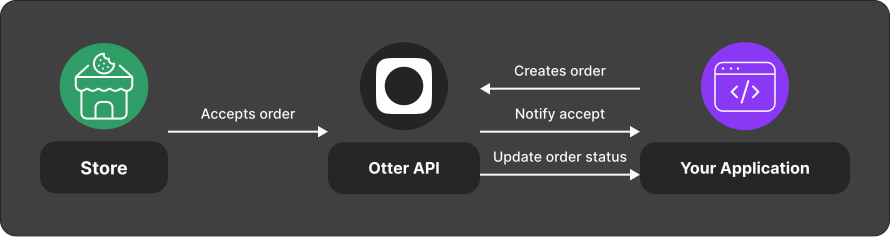
Integration overview
- Create an order with
POST /v1/orders— see Create an order. - Handle status webhooks (Order status update (
orders.order_status_update), optional Order ready notification (orders.order_ready) / handed-off) — see Order lifecycle. - Update status to
PREPARED/FULFILLED(andCANCELEDwhen needed) withPOST /v1/orders/{orderId}/status. Here,{orderId}is the external order id your app supplied at creation. A202 Acceptedresponse means the update was queued, not that the downstream transition completed. - Optionally update delivery info or line items when your product supports it (see below and the API reference).
- Handle intent-to-cancel events by confirming cancel via the status endpoint.
What you can call
| Capability | Method / path | Notes |
|---|---|---|
| Create order | POST /v1/orders | Store-scoped |
| Update status | POST /v1/orders/{orderId}/status | PREPARED, CANCELED, FULFILLED |
| Update delivery | PUT /v1/orders/{orderId}/delivery | Address, courier, location, notes |
| Update customer items | PUT /manager/order/v1/sources/{source}/orders/{orderId}/items | Scope manager.orders; dine-in / open-tab / d2c-eater-website only — see API reference |
| Close dine-in tab | POST /manager/order/v1/sources/{source}/orders/{orderId}/close | Scope manager.orders |
Events you receive
| Event | Meaning |
|---|---|
| Intent to cancel | Restaurant wants to cancel; confirm with status CANCELED and the matching X-Event-Id if cancellation succeeds. The API has no decline callback state. |
| Order status update | Status events such as ORDER_ACCEPTED, ORDER_READY_TO_PICKUP, ORDER_HANDED_OFF, and ORDER_FULFILLED (payload includes status history with timestamps). Rejected and canceled status events are not exposed. |
Test
- Use application credentials and a linked test store (Quickstart).
- Register a webhook URL and validate signatures.
- Create a low-risk test order, walk accept → prepared → fulfilled, and confirm webhook delivery.
- Repeat the create request with the same external order id; confirm the API
returns
409 Conflictand only one order exists.
Related
Next
Before go-live: confirm status mapping with the restaurant workflow, webhook signature checks, and rate limits.
Customer item modifications (advanced)
Updating customer items (PUT /manager/order/v1/sources/{source}/orders/{orderId}/items) is supported only for the d2c-eater-website integration, dine-in orders, and when the order tab is open. Otherwise the API returns 409; missing orders return 404. Success returns 202 Accepted. Requires scope manager.orders.
Each entry in customerItemModifications must set exactly one of: quantityUpdated, priceAdjusted, or itemAdded. See the API reference for field rules. Summary:
- itemAdded — Add a new line (new item or same item with different modifiers as a new line). Modifiers go on
addedItem.modifiers. - quantityUpdated — Change quantity of an existing line (including
0to remove). SendcustomerItemIds,quantity, andoldQuantity. - priceAdjusted — Order-level subtotal adjustment via
delta(positive = upcharge, negative = refund).