Orders (receive into your system)
Use this when Otter (or another connected channel) creates orders and your system — for example a POS — needs to ingest them and stay in sync on status.
Overview
Otter sends webhook events when an order is created and when its status changes. Your app receives those events, creates or updates the order locally, and keeps prep state aligned. Payload shapes live in the API reference.
How it fits
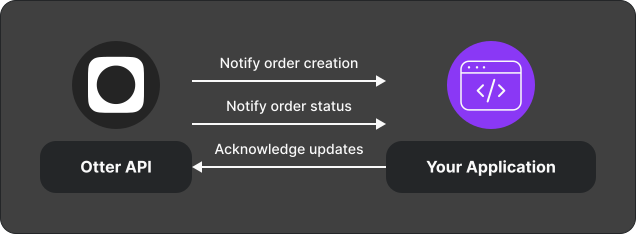
Integration overview
- Register a webhook URL and validate signatures.
- Handle the order create event — see Handle create events.
- Handle status notification events — see Handle status notifications.
Events you receive
| Event | Meaning |
|---|---|
Orders creation (orders.new_order) | A new order exists in Otter; payload includes the order |
Order status update (orders.order_status_update) | Status changed; keep your system in sync |
Test
- Point a webhook at your receiver.
- Create a test order through Otter (or ask your Account Representative for a fixture path).
- Confirm create + status events arrive and pass signature checks.
Related
Next
Wire create and status handlers, then confirm your status mapping matches kitchen workflow before go-live.