Cancel an order
Cancel an order before it is fulfilled — either from your app or after a restaurant intent-to-cancel.
Before you begin
- Order already created in Otter (Create an order)
- Status updates allowed for your app (
POST /v1/orders/{orderId}/status) - Webhooks registered if you need intent-to-cancel events
Steps
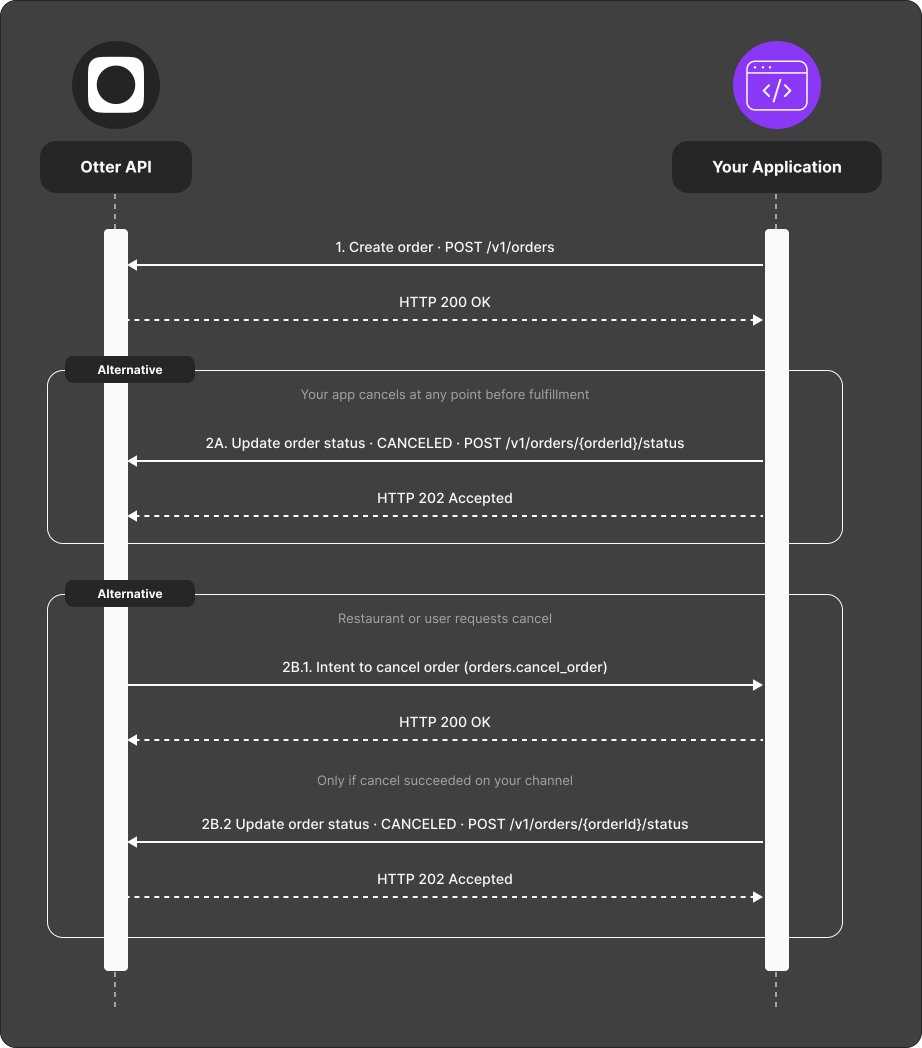
- Create the order with
POST /v1/orders(same as the create flow). - Cancel from your app (path A): After cancellation succeeds in your system, set status to
CANCELEDwithPOST /v1/orders/{orderId}/status. - Restaurant-initiated (path B):
- Otter sends an Intent to cancel order (
orders.cancel_order) webhook when a restaurant operator requests cancel. - If your channel requires it, attempt cancel on the online delivery / marketplace side.
- When cancel succeeds, set status to
CANCELEDwithPOST /v1/orders/{orderId}/statusand echo the webhook's event ID inX-Event-Id.
The cancellation callback contract has no decline state and no public
no-response deadline. If cancellation fails, do not acknowledge it as
CANCELED; follow the integration-specific reconciliation process agreed
during onboarding.
Verify
Cancel a test order both ways (your app and, if available, restaurant intent).
Confirm that the status endpoint returns 202 Accepted and that the eventual
order state matches. A 202 response confirms queueing only; it is not a
downstream completion acknowledgment.
Common failures
| Symptom | Likely cause | Fix |
|---|---|---|
| Intent webhook received but order still open | Forgot status update after channel cancel | Call status endpoint with CANCELED |
Status update returns 404 | Wrong or unknown external order id | Use the same externalIdentifiers.id supplied when the order was created |
Status update returns 202, but state has not changed yet | The update is still queued or downstream processing failed | Reconcile the order through the integration-specific process |