Order lifecycle
Understand the statuses an order moves through from create to fulfilled or canceled.
Overview
Orders start in NEW_ORDER (or a later status if your side already progressed). They move through accept → ready → fulfilled, or can be updated to CANCELED. Your app drives some updates with the status API; Otter notifies you of selected milestones via webhooks.
How it fits
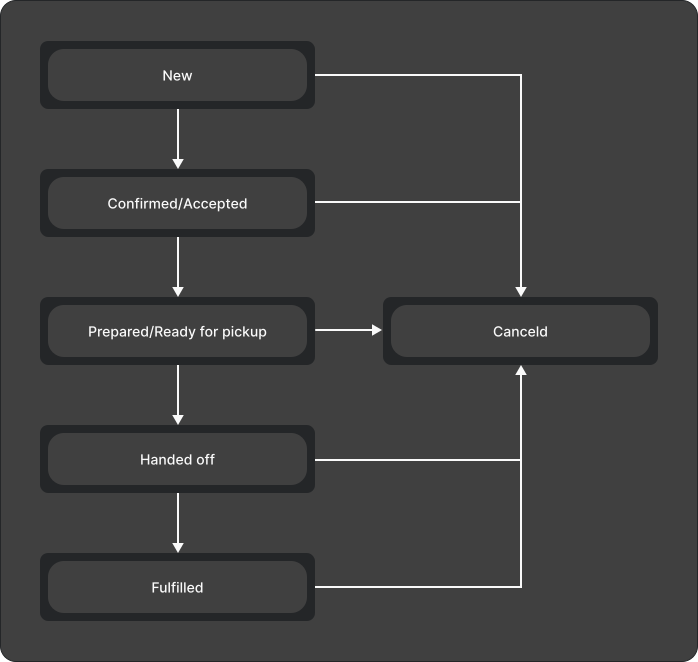
Integration overview
- Order is created in
NEW_ORDER(or an advanced status if prep already started on your side). - Restaurant accepts (manually or automatically) →
ORDER_ACCEPTED. - Prep completes →
ORDER_READY_TO_PICKUP. - Customer receives the order →
ORDER_FULFILLED(terminal success). - When cancellation succeeds on your side, submit
CANCELED.
Events and API updates
| Transition | Typical driver |
|---|---|
→ ORDER_ACCEPTED | Restaurant / Otter; Order status update (orders.order_status_update) |
→ ORDER_READY_TO_PICKUP | Restaurant / Otter; Order ready notification (orders.order_ready) when enabled |
Your app → PREPARED / FULFILLED / CANCELED | POST /v1/orders/{orderId}/status; 202 Accepted means queued |
→ ORDER_FULFILLED | Outbound fulfilled status event |
Exact enum names and payloads: API reference.
The status endpoint verifies that the order exists and queues the requested update. It does not synchronously enforce or confirm a public lifecycle transition graph. Status webhooks do not expose rejected or canceled events.
Related
Next
Implement Create an order, then wire status webhooks with signature validation.