Publish a menu
Sync menus from Otter to your integrated service after Otter matches entities with what you already have on the target.
Before you begin
- Webhooks registered and signatures validated
- Store linked (Quickstart)
- Callback endpoints implemented per API reference
Steps
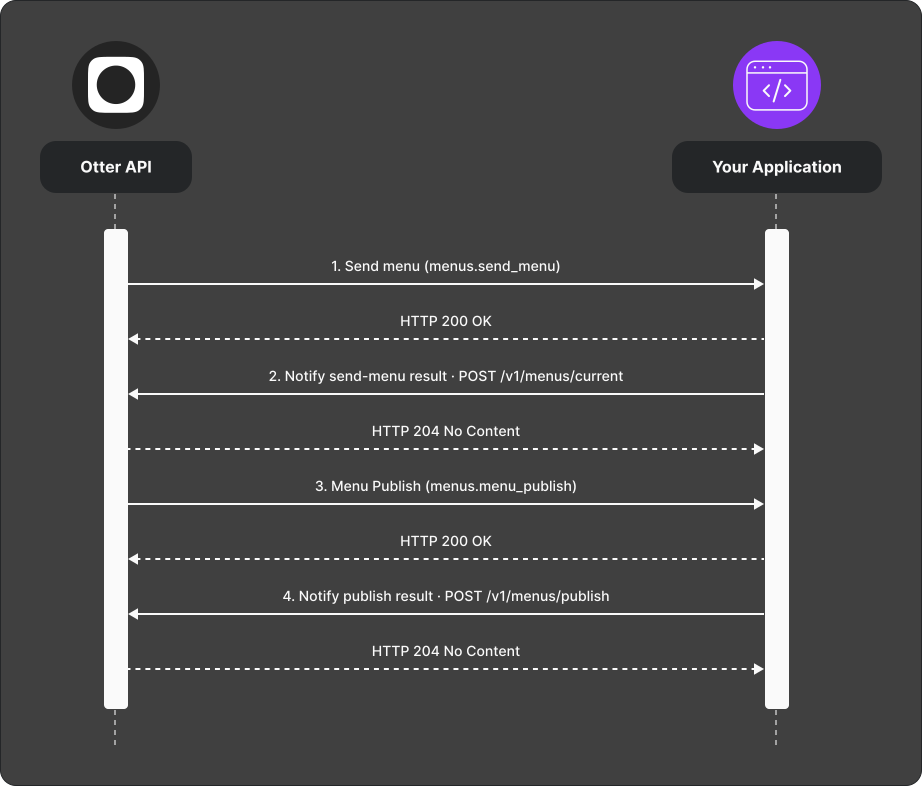
- Otter sends a Send menu (
menus.send_menu) webhook — return the store’s current menus viaPOST /v1/menus/current. - Otter matches entities to prior ids and sends a Menu Publish (
menus.menu_publish) webhook with matched, new, and omitted (delete) entities. - Apply the publish on the target.
- Send the callback with ids for newly created menu entities via
POST /v1/menus/publish.
Verify
After a full publish cycle, confirm menus on the target match Otter and new entity ids are returned in the callback.
Common failures
| Symptom | Likely cause | Fix |
|---|---|---|
| Publish stalls | Missing send-menu response or wrong ids | Complete step 1; reuse stable ids from prior syncs |
| User sees opaque error | Callback error message not friendly | Use Handle failed events with a clear message |