Handle failed events
Tell Otter when you cannot complete a menu webhook operation so users see a clear error.
Before you begin
- You received a menu webhook (publish, hours, availability, or send menu) and cannot complete it on the target
Steps
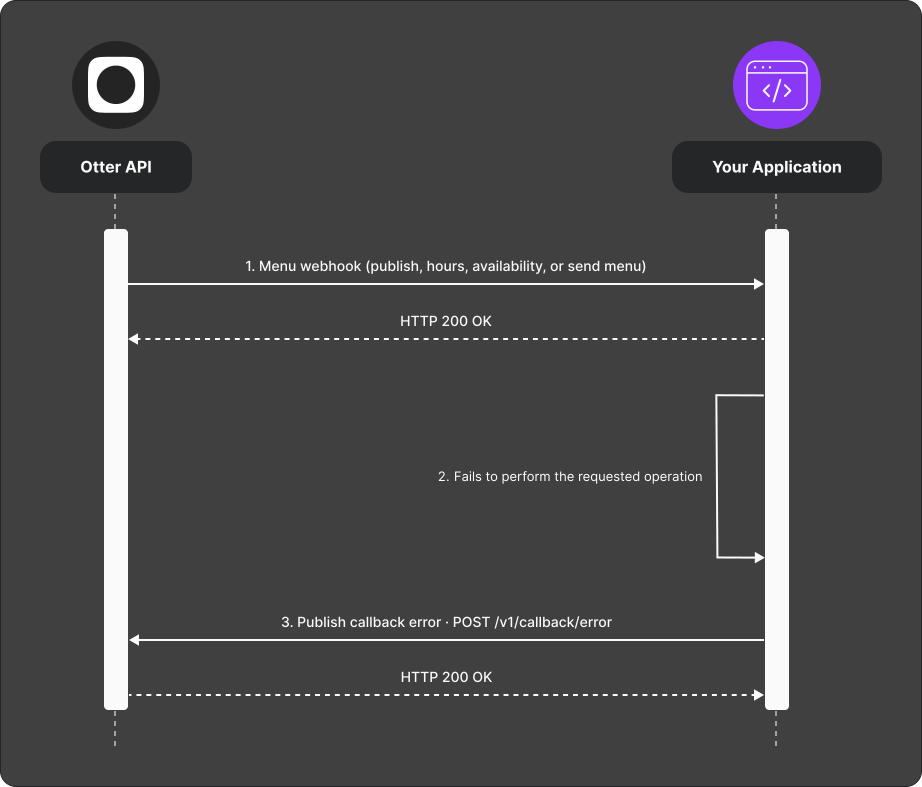
- Otter sends a menu webhook requesting work on the integrated service.
- Your app cannot complete the operation on the target.
- Call
POST /v1/callback/errorwith the event id from the webhook and a user-friendly failure reason.
Verify
Force a known failure (for example invalid entity id) and confirm Otter surfaces your message to the user.
Common failures
| Symptom | Likely cause | Fix |
|---|---|---|
| Error not shown to user | Message too technical or missing event id | Use plain language; pass the webhook event id |
| Duplicate retries | Otter retries webhook | Make callback idempotent where possible |