Deprecated
The Account Pairing API and its guides are deprecated and may be removed in a future release. Contact your Otter representative for migration options.
Onboard a store
Complete store pairing automatically: accept the upsert webhook, validate the store, and register your external store id.
Before you begin
- Webhooks configured: Fetch Store Credentials (
stores.fetch_credentials) (if you need custom credentials) and Upsert Store (stores.upsert) - Ability to call
POST /v1/storeswith your external store id
Steps
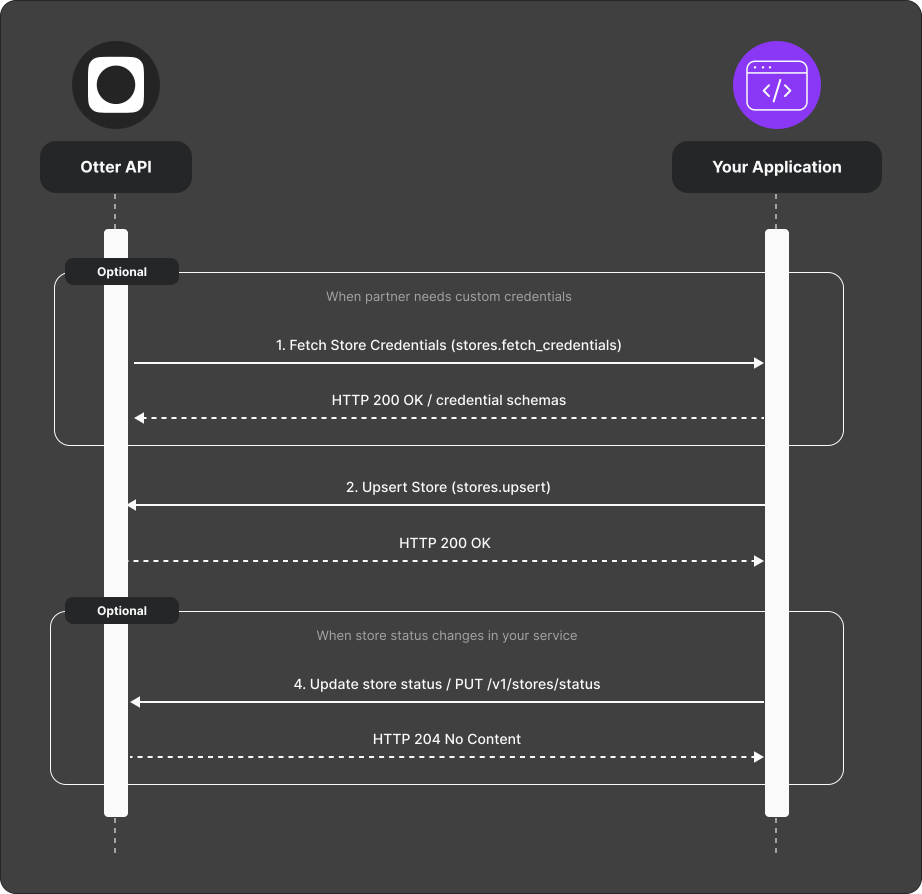
- (Optional) Implement Fetch Store Credentials (
stores.fetch_credentials) to return credential schemas synchronously. Values appear in the Upsert Store (stores.upsert) payload when configured. - When Otter adds a store, Upsert Store (
stores.upsert) fires — return 2xx if you accept the store. - Validate the store on your side.
- Register your external store id with
POST /v1/stores. - Use
PUT /v1/stores/statusto suspend, activate, or invalidate the store as needed.
Verify
Complete onboarding for a test store; store-scoped API calls with X-Store-Id succeed.
Next
- Stores & account pairing overview
- Partial store onboarding — if you need a manual finish step