Create a delivery
Quote, accept, and update a delivery job until it is completed or canceled.
Before you begin
- Delivery webhooks configured and signatures validated
- Callback endpoints implemented per API reference
Steps
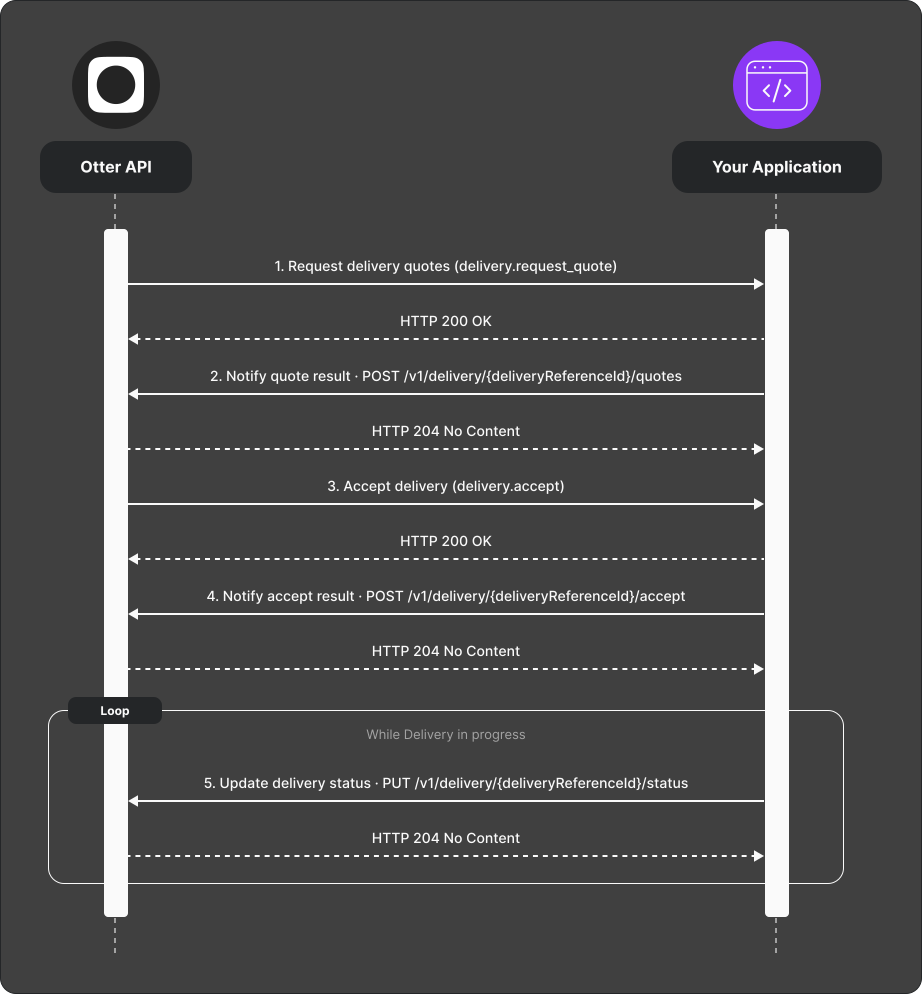
- Otter requests quotes via Request delivery quotes (
delivery.request_quote). - Respond through
POST /v1/delivery/{deliveryReferenceId}/quotes:- Send
availability: AVAILABLEwith fare and pickup estimates when you can fulfill the delivery. - Send
availability: UNAVAILABLEwith an optionalunavailableReasonwhen you cannot fulfill it. Omit pricing and pickup estimates. - Respond promptly. Otter currently waits up to 45 seconds for the correlated result.
- Send
- When Otter accepts a quote, receive Accept delivery (
delivery.accept). - When delivery creation succeeds, acknowledge it with
POST /v1/delivery/{deliveryReferenceId}/accept. If creation fails, usePOST /v1/delivery/callback/error; the accept callback has no decline state. - Until terminal state, send updates via
PUT /v1/delivery/{deliveryReferenceId}/status(status, addresses, courier, vehicle, notes).
Quotes do not expose a fixed time-based validity duration. A quote remains eligible while its internal state is pending; a new quote request supersedes earlier pending quotes.
Typical lifecycle: ALLOCATED → PICKED_UP → COMPLETED. You may send
CANCELED, and Otter accepts some updates with intermediate statuses omitted.
A 204 status response means the update was queued, not that the final state
was applied.
Verify
Run both paths:
- Available: quote → accept → picked up → completed.
- Unavailable: quote callback returns
UNAVAILABLE; no delivery is accepted. - Replay a stored callback with the same event ID and confirm that it returns
409instead of creating another result.