Handle create events
Ingest orders Otter created internally (integrations or manual entry) into your POS or back office.
Before you begin
- Webhook receiver for Orders creation (
orders.new_order) events - Keep webhooks secure
- Async processing path if you cannot finish within the webhook timeout
Steps
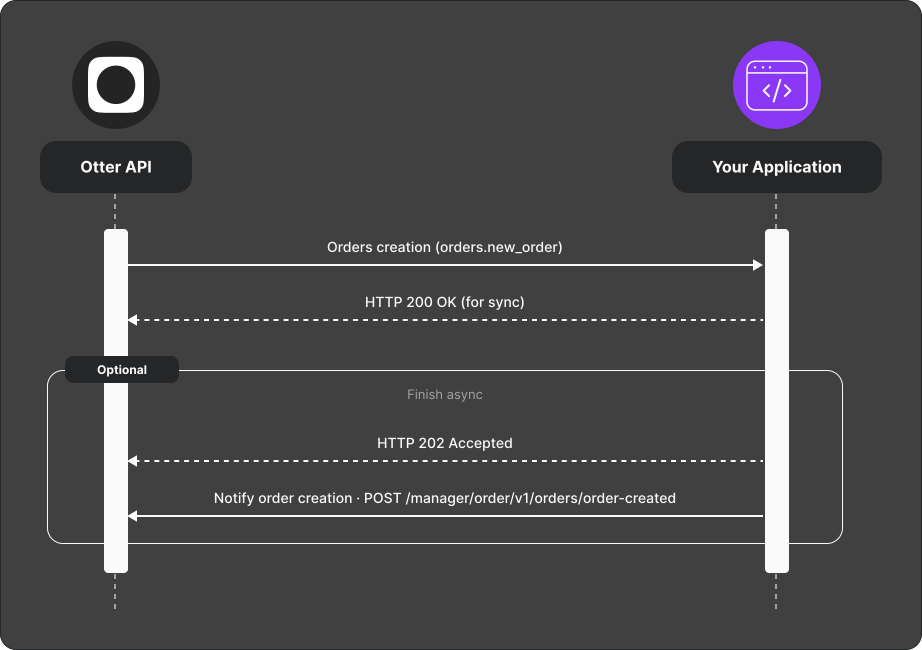
- Otter sends an Orders creation (
orders.new_order) webhook with the order payload. - Respond with:
- HTTP 200 — processed synchronously, or
- HTTP 202 — accepted for async processing; when finished, acknowledge with
POST /manager/order/v1/orders/order-created(scopemanager.orders), sending the original webhook’sX-Event-Id.
- On failure, report via
POST /v1/callback/error.
Verify
Trigger a create event; your system shows the order and Otter receives 200/202 as appropriate.