Deprecated
The Reports API and its guides are deprecated and may be removed in a future release. Contact your Otter representative for migration options.
Report without a notification
Poll for report status when you do not use the Report generated (reports.report_generated) webhook.
Before you begin
Steps
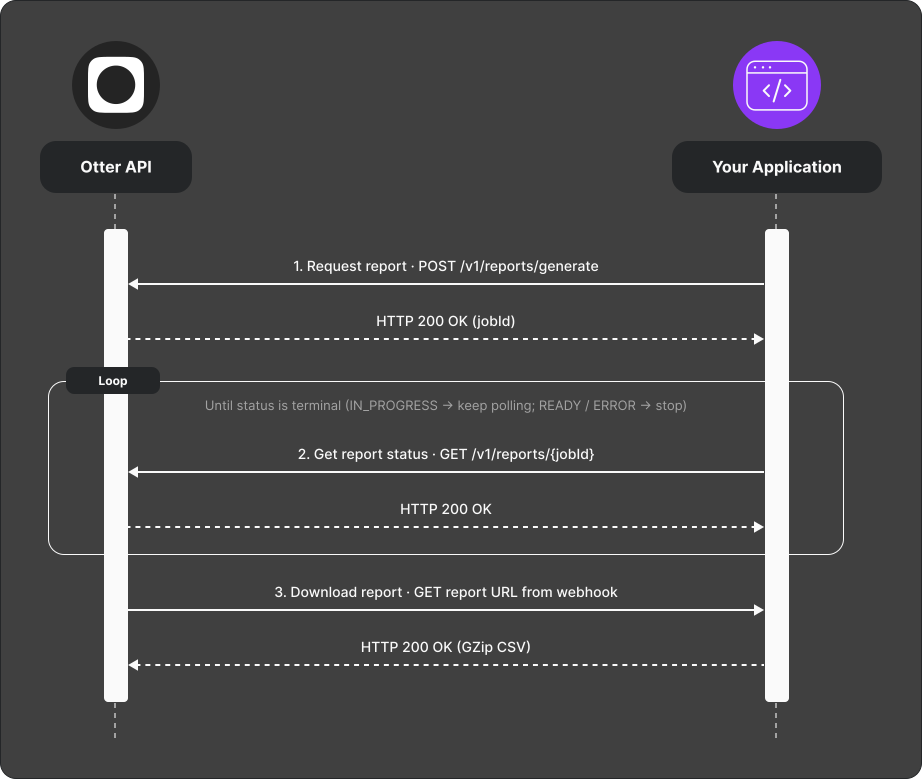
POST /v1/reports/generatewith type, an inclusive UTC start/end date range, and filters → a newjobId.- Poll
GET /v1/reports/{jobId}until status is terminal. - Status values:
IN_PROGRESS— keep pollingREADY— download from URL in responseERROR— read error details in responseEXPIRED— generate a new report; the download URL is no longer available
- Download the comma-delimited UTF-8 CSV promptly when
READY. Otter returnsEXPIREDtwo days after workflow completion.
Verify
Generate a test report; polling reaches READY and the URL returns a valid file.
Common failures
| Symptom | Likely cause | Fix |
|---|---|---|
Stuck IN_PROGRESS | Large range or backlog | Widen poll interval; narrow date range |
ERROR | Invalid filters or type | Check API reference |
EXPIRED | Report download window elapsed | Generate a new report |