Get store availability
Report whether a store is open, paused, or otherwise unavailable when Otter asks on a schedule.
Before you begin
- Store hours sent via
POST /v1/storefront/hours(Storefront overview) - Webhook receiver registered
Steps
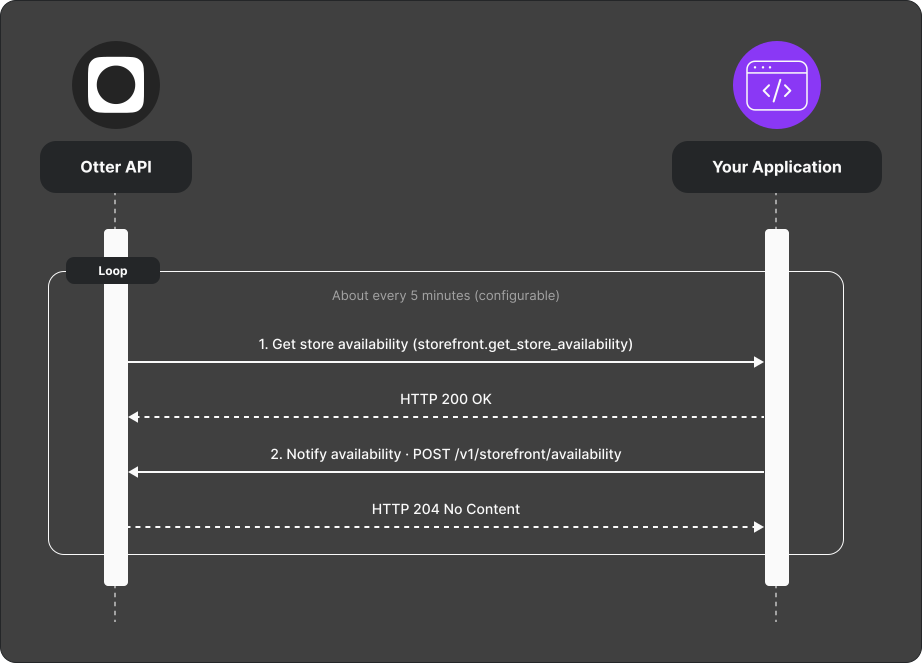
- Otter sends a Get store availability (
storefront.get_store_availability) webhook (default about every 5 minutes; configurable in Otter Developer Portal). - Read current state from your storefront (preferred) or your internal source of truth.
- POST current state to
POST /v1/storefront/availability.
Tip: If availability POST fails because hours are missing, set hours with POST /v1/storefront/hours and retry.
Verify
After configuring hours, confirm periodic webhooks arrive and your availability POST succeeds.
Common failures
| Symptom | Likely cause | Fix |
|---|---|---|
| Availability rejected | Hours not configured | POST hours first |
| Stale state in Otter | Not reading live storefront status | Query target system on each webhook |