Read, send, and upsert menus
Read menus stored in Otter, replace a store's complete menu snapshot, return the current menu when Otter requests it, and track asynchronous menu jobs to completion.
POST /v1/menusreplaces the complete menu snapshot. It is not a partial update. Include every entity that should remain.
Before you begin
- Application credentials and store linked
- Stable ids for categories, items, and modifiers (your system ids — Otter reuses them)
- A webhook endpoint configured for menu events
Steps
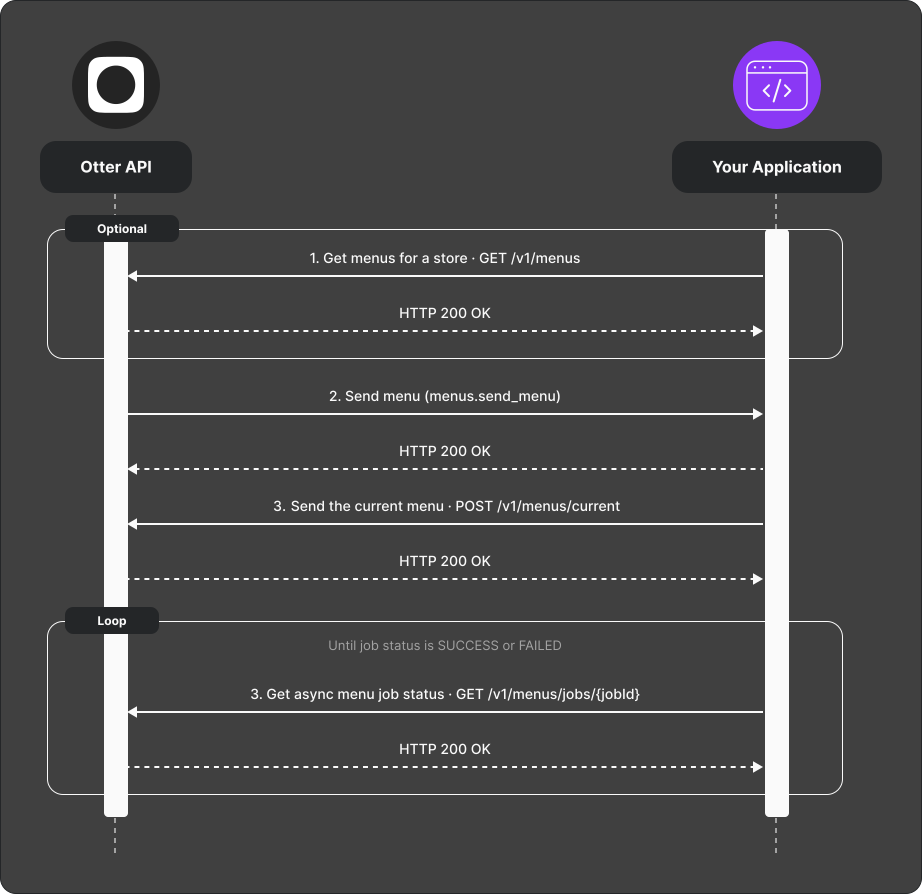
Replace the complete menu
- Optionally read all menus for the store with
GET /v1/menus. - Build the complete desired menu state. Customer-menu entities omitted from the relationship graph are deleted. Entries present only in top-level maps but unreachable from menus, categories, or items are not processed.
- Replace the menu with
POST /v1/menus. The202 Acceptedresponse includes a pending job id. It confirms workflow submission, not that menus or photos were persisted. - Poll
GET /v1/menus/jobs/{jobId}until status isSUCCESSorFAILED.
For overnight hours, set the end time earlier than the start time on the day
service begins. For example, Monday 20:00 to 02:00 means Monday evening
through Tuesday at 02:00. Do not split it into two API intervals.
Return the current menu when requested
- Receive the
Send menu (
menus.send_menu) webhook and acknowledge it with a2xxresponse. - Return the store's current menu through
POST /v1/menus/current. Send the webhook's event ID in theX-Event-Idheader. - Poll
GET /v1/menus/jobs/{jobId}for the associated menu job until its status isSUCCESSorFAILED.
Verify
- Upsert a test menu and wait for
SUCCESS. - Send the same complete payload again and verify the resulting menu is unchanged. Each submission still creates a new workflow; this is not an idempotency guarantee.
- Remove one customer item from the complete payload, upsert again, and verify that item is deleted.
- Trigger a Send menu event. Confirm that your webhook and menu callback return
successful
2xxresponses, then verify that the associated menu job reachesSUCCESS.
Common failures
| Symptom | Likely cause | Fix |
|---|---|---|
| Send menu event not received | Webhook destination is not configured for the event | Check the webhook configuration for your app |
Callback returns 400 or 404 | Missing or incorrect store or event ID | Use the store ID and top-level event ID from the webhook |
Callback returns 422 | Menu payload does not match the expected schema | Compare the payload with the menu send callback |
Job remains PENDING | The menu is still being processed or the service is backlogged | Continue polling with backoff and check rate limits |
Job reaches FAILED | The asynchronous menu operation could not be completed | Inspect the job error and correct the menu data before retrying |
| Existing entities disappear | The replacement payload omitted them | Read the current menu, merge intended changes, and send the complete desired state |
| Ambiguous response after submission | The workflow may already have started | Inspect the menu and job status before resubmitting |
Inbound menu and photo limits are not represented by the publish-target capabilities in the Integration Registry. Confirm applicable payload, entity, photo, and template-menu restrictions during onboarding.