Financial transactions
Send order financials to Otter after the order concludes.
Before you begin
- Order exists in Otter (typically via
POST /v1/orders) - Financial breakdown ready on your side
Steps
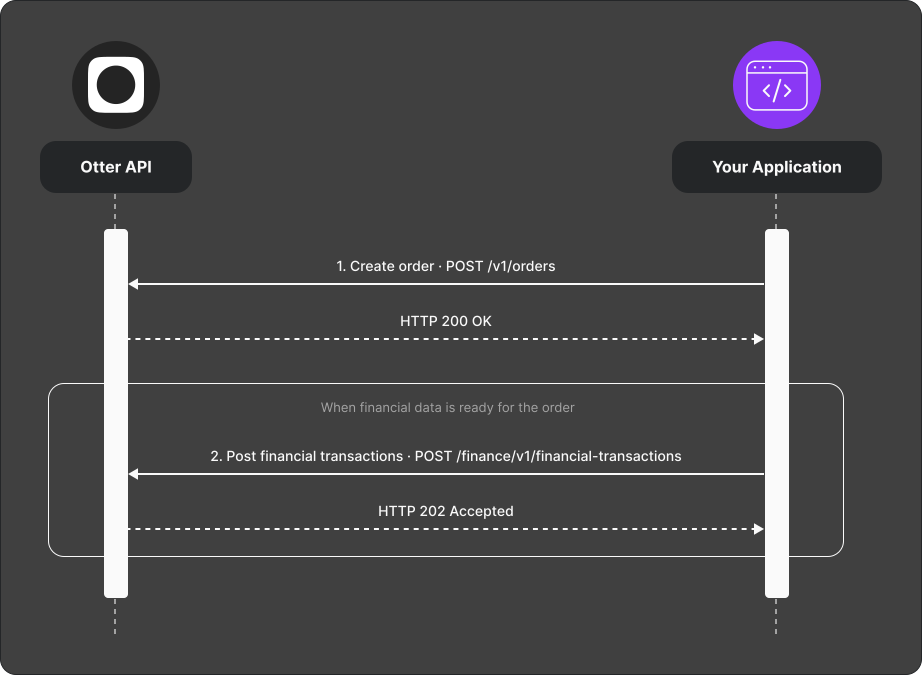
- Create the order with
POST /v1/ordersif needed. - Post financial data with
POST /finance/v1/financial-transactions. - Expect HTTP 202 — synchronous validation passed and the payload was published to the ingestion queue. This is not confirmation of downstream validation, order association, or persistence.
- While
pendingistrue, resubmit to fix or update the same transaction. Preserve the external transaction ID and store ID. For invoice transactions, preserve the payout ID as well.
The same identity values update an existing transaction. Changing an identity
value may create a separate transaction. Although pending: false indicates a
finalized transaction, the current ingestion API does not reject a later
submission with the same identifier.
Verify
Post a test transaction and receive 202. Retain the submitted external
transaction identifiers for reconciliation. Resubmit with pending: true and
confirm the update is accepted.
Also test a wrong external order ID. The request can still return 202 because
order association happens downstream; use this to verify your reconciliation
controls rather than treating queue acceptance as completion.